Active-page image scan
Review images and nearby accessibility signals on the page you choose to scan.
Free Chrome extension
A focused, local-first way to review image accessibility, alt text, accessible-name signals, image context, metadata, related markup, and in-page markers.
Current focus: this public release is free-only and centered on image accessibility review. It is not a full WCAG audit or a replacement for human accessibility judgement.
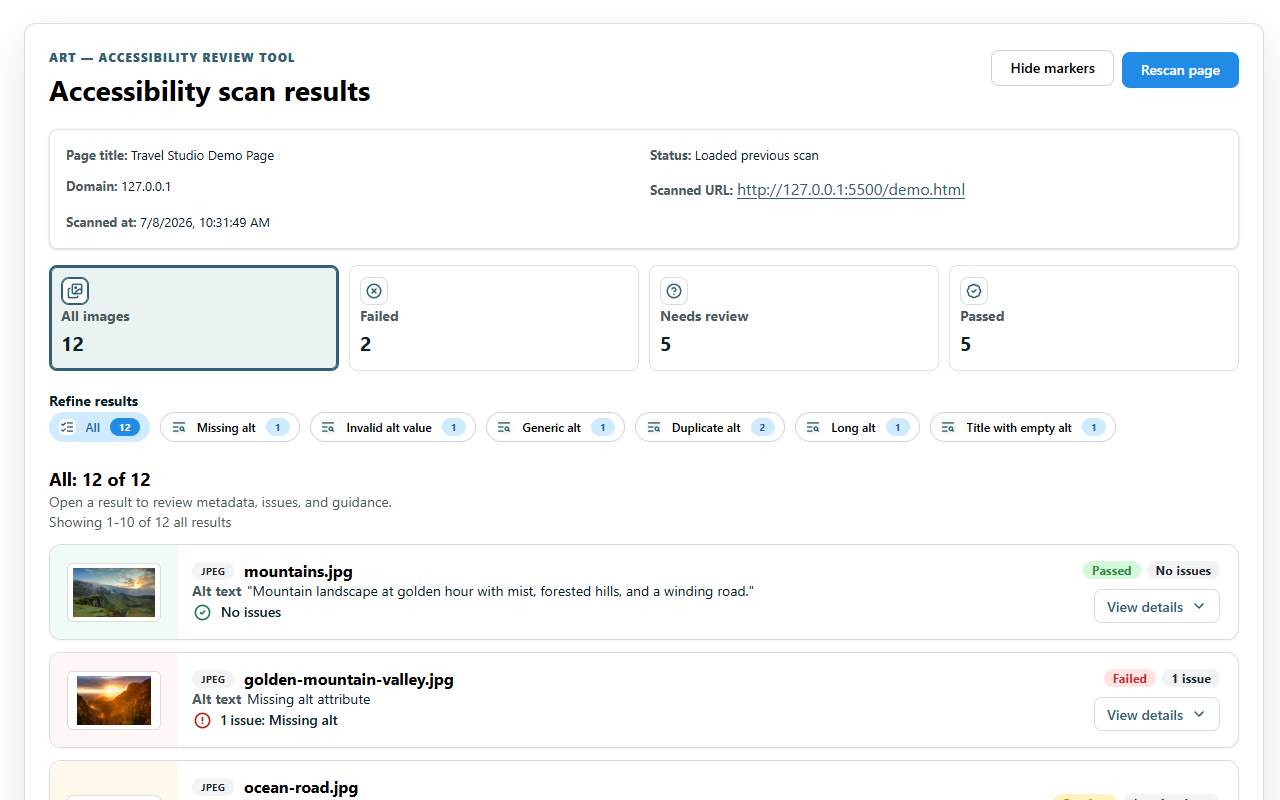
ART scan results from the Chrome extension.
What ART does
ART scans the active page when you run it and brings image-related accessibility details into one review surface. It helps reviewers inspect likely issues and context faster while keeping the final judgement with the person doing the review.
Who it is for
Key features
Review images and nearby accessibility signals on the page you choose to scan.
Inspect alt text, accessible-name-related details, context, metadata, and related markup.
Connect findings back to visible content so review work stays grounded in the page.
Run normal free scans without an account and without uploading scan results to an ART backend.
Local-first trust points
The current extension does not upload normal free scans to a backend and does not use AI. It is built for lightweight review work inside Chrome without payments, dashboards, saved scan history, or login.
Read the current privacy policyFocused scope
ART can help you inspect image-related signals, but it does not perform a full WCAG audit, prove compliance, or replace manual testing with assistive technologies and accessibility expertise.
Install ART
Install ART from the Chrome Web Store.